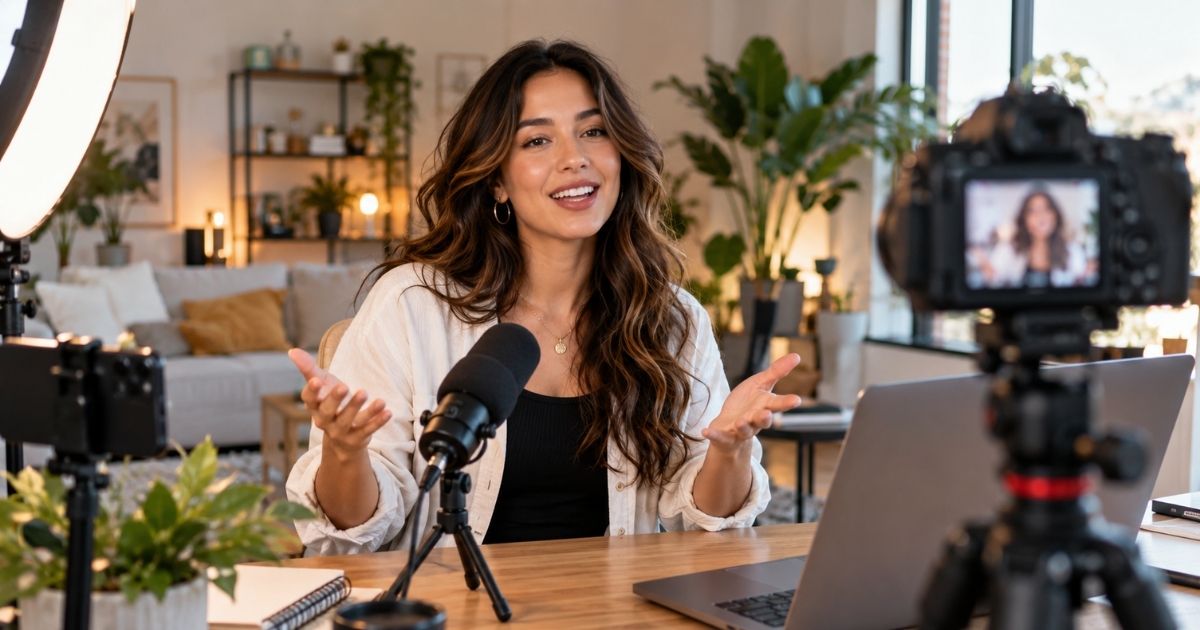
Talking Head Video Production helps B2B and DTC brands communicate through a person speaking directly to the audience on camera. VID produces Talking Head Videos with founders, executives, employees, subject-matter experts, customers, creators, and professional spokespeople for thought leadership, product education, social media, sales enablement, training, announcements, recruiting, and brand communication. Production can include scripting or talking points, teleprompter support, remote or on-site capture, professional lighting and audio, multiple camera angles, B-roll, screen recordings, captions, graphics, and platform-specific edits. The goal is to make expertise and messaging more human, credible, and easy to consume while creating a repeatable format that can support everything from a single high-value video to an ongoing content series.

Talking Head Video Production for B2B Companies
Create professional Talking Head Videos for thought leadership, product education, social, sales, training, and marketing. VID handles strategy, filming, editing, and delivery.
Talking Head Video is one of the simplest and most versatile video formats.
The core setup is straightforward:
One person speaking directly to camera.
That person might be:
- Founder
- CEO
- Executive
- Employee
- Subject-matter expert
- Customer
- Creator
- Professional spokesperson
The format can range from a simple social video to a polished multi-camera production.
Its strength comes from giving information a human voice and face.
Best For
Talking Head Video Production is especially useful for:
- B2B SaaS
- Technology companies
- Professional services
- Healthcare and HealthTech
- Financial services
- DTC brands
- Founder-led companies
- Executive thought leadership
- Product marketing
- Sales enablement
- Customer education
- Training
- Internal communications
- Recruiting
- Social media teams
Talking Head Video Production Process
Message Strategy
Define:
- Audience
- Topic
- Objective
- Key message
- Desired next action
- Distribution channel
Speaker Preparation
Determine who should deliver the message and how they communicate best.
Script or Talking Points
Choose between:
- Full script
- Teleprompter
- Talking points
- Interview prompts
- Guided conversation
Production Setup
Plan:
- Camera
- Lighting
- Audio
- Background
- Framing
- Wardrobe
- Teleprompter
- Multiple camera angles where needed
Capture
Record remotely, in-studio, on location, or at the company’s office.
Post-Production
Add:
- Captions
- Graphics
- B-roll
- Product footage
- Screen recordings
- Music
- Motion graphics
- Branded elements
Versioning
Create versions for:
- YouTube
- TikTok
- Website
- Sales
- Internal communications
Talking Head Video for B2B
B2B Talking Head Video is especially effective when buyers need expertise and clarity.
Common topics include:
- Industry insights
- Buyer problems
- Product education
- Customer questions
- Sales objections
- Market commentary
- Executive perspective
- Implementation
- Business strategy
The format can make complex ideas easier to understand by connecting them to a credible person.
Talking Head Video for DTC Brands
DTC brands can use Talking Head Video for:
- Founder content
- Product education
- Product launches
- Offers
- Customer FAQs
- How-to content
- Social ads
- Creator-style content
- Behind-the-brand stories
The production can range from highly polished studio content to more natural platform-native delivery.
Talking Head Video for Social Media
Talking Head Video works especially well for social because the production can be simple, repeatable, and personal.
Useful social formats include:
- Opinions
- Tips
- Industry commentary
- FAQs
- Myths
- Customer questions
- Product education
- Founder stories
- Lessons learned
One recording session can create many standalone clips.
Talking Head Video for LinkedIn
LinkedIn Talking Head Video can support:
- Executive visibility
- Thought leadership
- Founder content
- Sales education
- Customer proof
- Product marketing
- Industry commentary
The strongest videos usually focus on one idea rather than trying to cover an entire topic in one post.
Talking Head Video for YouTube
Talking Head Video can also support longer-form YouTube content.
Formats may include:
- Educational videos
- Industry analysis
- Product education
- Founder commentary
- Executive Q&A
- Tutorials
- Opinion content
The presenter can be supported by B-roll, graphics, screen recordings, and chapters.
Talking Head Video for Sales
Sales teams can use Talking Head Video for:
- Prospecting
- Personalized outreach
- Follow-up
- Proposal explanation
- Objection handling
- Product education
- Executive introductions
- Account-specific messaging
This can make communication feel more personal without requiring another live meeting.
Talking Head Video for Training
Training content can use a presenter or subject-matter expert to guide learners through:
- Products
- Processes
- Policies
- Skills
- Software
- Compliance
- Onboarding
Presenter footage can be combined with demonstrations and screen recordings to improve clarity.
Talking Head Video for Internal Communications
Leadership can use Talking Head Video for:
- Company updates
- Strategy
- Organizational changes
- Culture
- New initiatives
- Employee recognition
- Quarterly updates
Direct-to-camera communication can feel more personal than a written company memo.
Talking Head Video for Recruiting
Employees and executives can speak directly to candidates about:
- Culture
- Mission
- Leadership
- Team experience
- Career growth
- Open roles
Talking Head Video can be combined with workplace B-roll to create stronger recruiting content.
Scripted vs. Unscripted Talking Head Video
Both approaches can work.
Scripted
Useful when:
- Exact wording matters
- Messaging is sensitive
- The video is an ad
- The content needs to be concise
- Legal or compliance review is required
Unscripted
Useful when:
- Expertise matters
- Natural personality matters
- Thought leadership is the objective
- The speaker is comfortable talking through ideas
A guided interview can provide structure without making the speaker sound scripted.
Teleprompter vs. Talking Points
A teleprompter is useful when messaging needs to be precise.
Talking points may work better when the goal is natural, conversational delivery.
VID can determine the right approach based on:
- Speaker
- Topic
- Runtime
- Channel
- Message sensitivity
Single-Camera vs. Multi-Camera Talking Head Video
Single Camera
Works well for:
- Social
- Sales
- Internal updates
- Short-form content
- Remote capture
Multi-Camera
Can add visual variety to:
- Long-form education
- Executive interviews
- Courses
- Thought leadership
- Presentations
Multiple angles can make longer videos feel more dynamic.
Background and Set Design
The environment behind the speaker influences how the video feels.
Possible setups include:
- Office
- Studio
- Branded set
- Natural workplace
- Home office
- Event environment
- Seamless backdrop
- Environmental location
The setting should support the credibility and tone of the message.
Talking Head Video With B-Roll
Talking Head Video does not need to show the speaker continuously.
Supporting visuals can include:
- Product footage
- Screen recordings
- Workplace activity
- Customer footage
- Data
- Charts
- Photos
- Animation
- Environmental B-roll
This can improve pacing and make more complex topics easier to understand.
Talking Head Video With Screen Recording
Screen recording works especially well for:
- SaaS
- Apps
- Product demos
- Tutorials
- Training
- Product marketing
The presenter can introduce and explain the topic while the screen demonstrates the actual workflow.
Talking Head Video With Animation
Motion graphics and animation can support:
- Data
- Key messages
- Diagrams
- Product concepts
- Statistics
- Technical processes
Animation should clarify the speaker’s message rather than compete with it.
Remote Talking Head Video
Talking Head Video can be produced remotely when travel or scheduling makes on-site production unnecessary.
Remote production can include:
- Camera guidance
- Lighting guidance
- Audio
- Remote direction
- High-quality local recording
- Screen capture
- Professional editing
This works particularly well for recurring executive and subject-matter expert content.
Talking Head Video Content Days
Batch production can make Talking Head Video highly efficient.
One recording session can capture:
- Thought leadership
- FAQs
- Product content
- Sales videos
- Social posts
- Company updates
- Educational content
A planned content day can create weeks of finished assets from a concentrated block of filming.
Talking Head Video vs. Spokesperson Video
A Talking Head Video describes the visual format.
A Spokesperson Video describes the person’s role.
A spokesperson may appear in a Talking Head Video, but a Talking Head Video may also feature:
- Founder
- Executive
- Customer
- Expert
- Employee
The speaker does not necessarily need to be acting as a formal brand spokesperson.
Talking Head Video vs. Executive Video
An Executive Video is defined by who appears.
A Talking Head Video is defined by how the content is presented.
An executive can appear in many formats, including interviews, podcasts, documentaries, or Talking Head Videos.
Talking Head Video vs. Interview Video
In a Talking Head Video, the speaker often addresses the camera directly.
In an Interview Video, the speaker usually responds to an interviewer or off-camera questions.
Interview footage can still be edited to feel like a direct-to-audience video.
Talking Head Video vs. UGC Video
UGC often uses a casual, creator-native style.
Talking Head Video is broader.
It can be:
- Casual
- Corporate
- Cinematic
- Studio-produced
- Executive-led
- Creator-led
UGC is one possible style of Talking Head Video.
Talking Head Video vs. Thought Leadership Video
A Thought Leadership Video is defined by its content.
A Talking Head Video is defined by its visual format.
Thought leadership can be delivered as a Talking Head Video, podcast, webinar, interview, or presentation.
Talking Head Video Repurposing
One Talking Head Video session can create:
- Long-Form Videos
- Short-Form Clips
- LinkedIn Videos
- Instagram Reels
- TikTok Videos
- YouTube Shorts
- YouTube Videos
- Paid Social Ads
- Sales Videos
- Website Content
- Email Videos
- Training Content
- Internal Communications
Measuring Talking Head Video Performance
Useful metrics may include:
- Views
- Watch time
- Completion rate
- Engagement
- Shares
- Saves
- Comments
- Click-through rate
- Leads
- Sales usage
- Product engagement
- Training completion
- Pipeline influenced
The right metric depends on the job the video is intended to perform.
When & Where You Can Use This Format
Use Talking Head Video when the message becomes stronger by hearing it directly from a person.
It is especially useful when:
- You want to build trust — Let the audience see and hear a credible person deliver the message.
- You need executive thought leadership — Turn leadership expertise into recurring video content.
- You need consistent social content — Batch-record multiple topics with one speaker.
- Your product needs explanation — Combine on-camera delivery with product footage or screen recordings.
- You want to educate customers — Use experts to teach topics, workflows, and best practices.
- Sales repeats the same explanation — Turn recurring sales messages into reusable video.
- You need internal communication — Have leaders communicate updates directly to employees.
- You want to make the brand more human — Put real people behind the company’s messaging.
- You need a scalable content format — Produce many videos from a focused recording session.
- You want a flexible source format — Use one recording to create long-form, short-form, social, sales, and website content.
"This is golden, Dallin. I had all these pieces in so many places it's hard to find them all. It's a more practical, comprehensive guide — Great to have a complete framework. I can't wait to help sell this"

"YouTube drove more sales than ever in February! 16.38% of new customers reported finding us on YouTube and 30% of non-word-of-mouth responses! (26% YTD)."
.png)
“VERY stoked on this. This could be a great solution for all our customers if we can keep the editing/creator quality this high.”

"447 social shares and over 2,000 impressions with millions in the sales. This has been one of our longest running, most successful ads!"
Examples Of This Format
- CEO Talking Head Video — A CEO shares company perspective, industry insight, or strategic direction.
- Founder Talking Head Video — A founder explains the company, product, philosophy, or market point of view.
- Executive Thought Leadership Video — Turn executive expertise into recurring LinkedIn or YouTube content.
- Product Explainer Talking Head Video — Have a product leader explain a product or feature with supporting visuals.
- Sales Video — Use an executive or salesperson to communicate a pitch, objection response, or next step.
- Customer Education Video — Have an expert explain a workflow, best practice, or concept.
- Social Media Talking Head Video — Create direct-to-camera content for LinkedIn, Instagram, TikTok, or YouTube Shorts.
- Training Video — Use a subject-matter expert or presenter to teach employees or customers.
- FAQ Video — Answer one common buyer or customer question directly to camera.
- Company Announcement Video — Have leadership explain important news or updates.
- Recruiting Video — Let employees or leaders speak directly to candidates.
- Internal Communications Video — Use leadership to communicate strategy, culture, policy, or organizational updates.
- Spokesperson Video — Use professional talent to deliver approved brand messaging.
- Course Video — Capture an instructor teaching structured lessons.
- Video Sales Letter — Use direct-to-camera presentation as the core of a persuasive sales narrative.
Commonly Asked Questions
What Is a Talking Head Video?
A Talking Head Video is a video where a person speaks directly to the camera as the primary visual and source of information.
The speaker may be an executive, employee, creator, customer, expert, or professional spokesperson.
What Are Talking Head Videos Used For?
They can support:
- Thought leadership
- Social media
- Product marketing
- Sales
- Training
- Education
- Recruiting
- Internal communications
- Advertising
- Company announcements
Who Should Appear in a Talking Head Video?
The best speaker depends on the message.
Possible speakers include:
- Founder
- CEO
- Executive
- Subject-matter expert
- Employee
- Customer
- Creator
- Professional spokesperson
Does a Talking Head Video Need a Script?
No.
It can use:
- Full script
- Teleprompter
- Talking points
- Interview questions
- Topic prompts
The production approach should fit the speaker.
Can VID Help Write Talking Head Scripts?
Yes.
VID can develop scripts, outlines, talking points, interview questions, and topic prompts based on the objective and speaker.
Can VID Help Someone Who Is Uncomfortable on Camera?
Yes.
VID can support:
- Preparation
- Coaching
- Teleprompter
- Guided interviews
- Multiple takes
- Performance direction
The goal is to make the process comfortable while preserving natural delivery.
How Long Should a Talking Head Video Be?
It depends on the use.
Examples include:
- Short Social Video — 30–90 seconds
- Sales Video — 30 seconds–3 minutes
- Product Explanation — 1–5 minutes
- Educational Video — 3–15+ minutes
- Long-Form Thought Leadership — 10–30+ minutes
Can Talking Head Videos Be Filmed Remotely?
Yes.
Remote capture can work especially well for recurring executive, social, sales, and educational content.
Can Talking Head Videos Include B-Roll?
Yes.
B-roll can make the content more visually engaging and provide context around what the speaker is explaining.
Can Talking Head Videos Include Captions?
Yes.
Captions are particularly useful for social, accessibility, and viewers watching without sound.
Can Talking Head Videos Include Product Screens?
Yes.
Screen recordings and product footage can be integrated throughout the edit.
Can Talking Head Videos Be Used for Paid Ads?
Yes.
Talking Head Ads can use:
- Founders
- Creators
- Customers
- Spokespeople
- Executives
and can be tested with multiple hooks, offers, and CTAs.
Can One Recording Session Create Multiple Talking Head Videos?
Yes.
Batch production is one of the major advantages of the format.
One session can create many videos around different questions, ideas, products, or messages.
Can Talking Head Video Be Part of VID Operate?
Yes.
Talking Head Video is especially well suited to VID Operate because executives, experts, products, and campaigns continuously create new topics worth communicating.
VID can manage recurring topic planning, scripts, capture, editing, repurposing, and delivery.
For a defined Talking Head Video series or one-time production, it can be scoped through VID Project.
What Makes a Strong Talking Head Video?
A strong Talking Head Video depends less on elaborate production and more on the person and message.
It should have:
- A credible speaker
- One clear idea
- Strong delivery
- Clean audio
- Professional visuals
- Useful supporting footage
- Concise editing
- A clear reason for the audience to keep watching
The goal is not simply to put someone in front of a camera.
It is to make what they know, believe, or need to communicate worth watching.
VID for
Talking Head Video
Turn expertise into clear, repeatable on-camera content with a simple production format that works across channels.