Training Video Production helps B2B companies standardize how knowledge is taught across employees, customers, partners, and distributed teams. VID produces Training Videos for onboarding, software instruction, product education, compliance, SOPs, role-specific skills, process training, certification, sales enablement, and customer success using presenters, subject-matter experts, screen recordings, demonstrations, interviews, animation, captions, and supporting graphics. Training content can be organized into individual lessons, modular libraries, or complete learning programs and delivered through an LMS, internal portal, help center, customer academy, or knowledge base. The goal is to reduce dependence on repeated live instruction, improve consistency, preserve institutional knowledge, and make important information easier to learn, revisit, and scale.
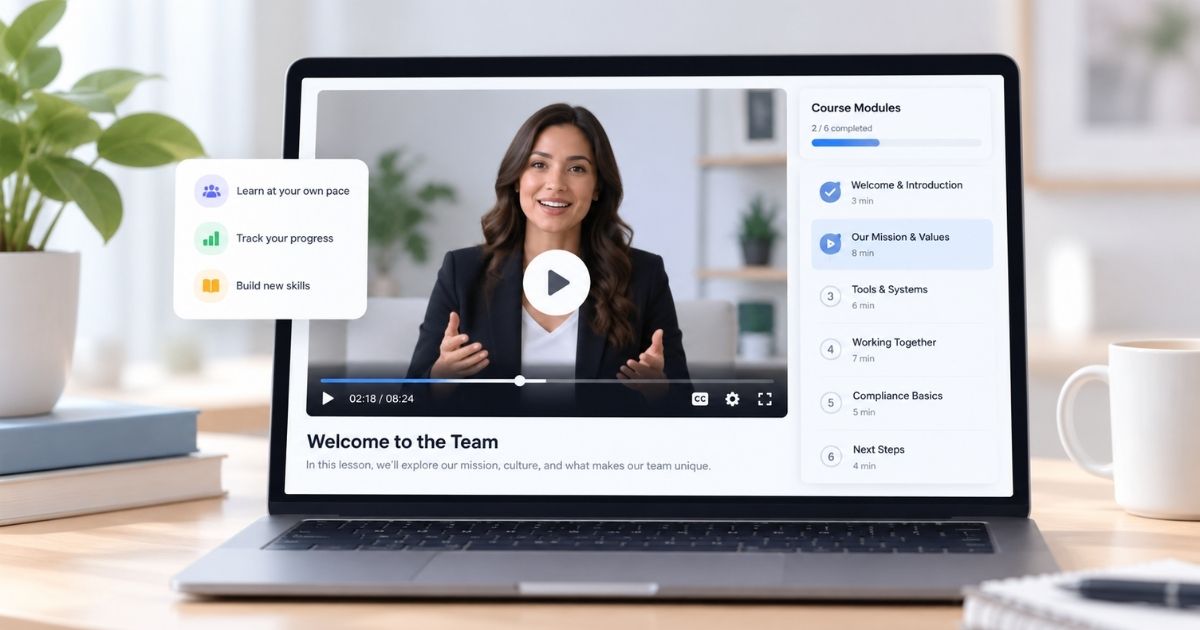
Training Video Production for B2B Companies
Create professional Training Videos for employee onboarding, product education, compliance, SOPs, and skills development. VID handles strategy, filming, editing, and delivery.
Training Video turns repeatable instruction into an on-demand learning asset.
Instead of relying on the same person to explain the same process again and again, companies can document that knowledge once and make it available whenever someone needs it.
Training Video can support:
- Employee onboarding
- Product training
- Software training
- Compliance
- SOPs
- Customer education
- Sales training
- Partner enablement
- Certification
- Leadership development
- Process training
- Technical instruction
Best For
Training Video Production is especially useful for:
- B2B SaaS
- Technology companies
- Healthcare organizations
- Financial services
- Professional services
- Manufacturing
- Multi-location businesses
- Distributed teams
- Fast-growing companies
- Learning and Development teams
- People and HR teams
- Customer success teams
- Sales enablement teams
- Partner programs
- Companies with repeated training needs
Training Video Production Process
Training Needs Assessment
Identify:
- Who needs training
- What they need to learn
- What they should be able to do afterward
- Where the training will live
- How completion will be measured
Learning Objectives
Define clear outcomes for each lesson or module.
Examples:
- Complete a workflow correctly
- Understand a policy
- Operate a system
- Demonstrate product knowledge
- Follow a safety process
Curriculum Structure
Organize the content into:
- Courses
- Modules
- Lessons
- Learning paths
- Assessments
Subject-Matter Expert Capture
Work with internal experts to extract the knowledge that needs to be taught.
Script and Lesson Development
Turn expertise into clear:
- Scripts
- Talking points
- Demonstrations
- Step-by-step instructions
- Visual aids
Production
Capture the appropriate combination of:
- Presenter-led instruction
- Screen recordings
- Demonstrations
- Interviews
- Voiceover
- Animation
- On-location footage
Post-Production
Add:
- Captions
- Graphics
- Diagrams
- Screen callouts
- Chapters
- Branded visuals
- Supporting examples
Delivery
Prepare videos for:
- LMS
- Internal portal
- Knowledge base
- Help center
- Customer academy
- Partner portal
- Intranet
Training Video for Employee Onboarding
Employee onboarding video can create a consistent first experience for every new hire.
A program may include:
- Welcome from leadership
- Company overview
- Mission and values
- Employee expectations
- Product education
- Internal systems
- Department introductions
- Core processes
- Policies
- Compliance
- Role-specific instruction
This allows live onboarding time to focus more on questions, relationships, and application rather than repeating foundational information.
Training Video for Customers
Customer Training Video helps users understand how to adopt and use a product successfully.
Topics may include:
- Setup
- Account configuration
- Core workflows
- Features
- Integrations
- Best practices
- Troubleshooting
- Advanced use cases
A strong training library can support customer onboarding, adoption, retention, and support.
Training Video for SaaS and Software
Software Training Video can combine:
- Screen recordings
- Presenter-led instruction
- UI callouts
- Zoomed interface views
- Motion graphics
- Voiceover
- Examples
Training can be organized by:
- Role
- Workflow
- Feature
- Skill level
- Customer journey stage
Training Video for SOPs
SOP Training Videos make written procedures easier to understand by showing the process in action.
They can document:
- Operational workflows
- Equipment setup
- Quality-control procedures
- Software processes
- Customer service standards
- Administrative tasks
- Safety procedures
Video is especially useful when the process is visual or difficult to describe with text alone.
Training Video for Compliance
Compliance Training Video can help organizations deliver consistent instruction around topics such as:
- Workplace policies
- Data security
- Privacy
- Safety
- Ethics
- Harassment prevention
- Industry-specific procedures
- Regulatory requirements
Training should be structured around the organization's actual compliance requirements and reviewed by appropriate internal or legal stakeholders.
Training Video for Sales Teams
Sales Training Video can support consistent enablement across new and existing salespeople.
Topics may include:
- ICP
- Messaging
- Discovery
- Product knowledge
- Objection handling
- Competitive positioning
- Demo process
- Proposal process
- CRM workflows
- Customer stories
This creates a reusable learning library salespeople can revisit when needed.
Modular Training Libraries
Training content is often easier to use when broken into focused modules rather than one long video.
For example:
Course: New Sales Representative Training
- Company and Market Overview
- Ideal Customer Profile
- Messaging
- Discovery
- Product Overview
- Product Demo
- Objection Handling
- CRM Process
- Proposal Process
- First 30 Days
Modular content is easier to assign, update, search, and reuse.
Microlearning Video
Microlearning breaks training into short lessons focused on one skill, concept, or task.
Examples include:
- How to complete one workflow
- How to use one feature
- One sales objection
- One safety reminder
- One manager skill
Short modules can make training easier to revisit at the exact moment someone needs it.
Role-Based Training
Different teams need different knowledge.
Training libraries can be organized by role for:
- Sales
- Marketing
- Customer Success
- Operations
- Finance
- Product
- Engineering
- Managers
- Executives
- Partners
This keeps training relevant and prevents employees from sitting through material that does not apply to their work.
Training Video vs. Educational Video
An Educational Video broadly teaches a concept, idea, or skill.
A Training Video is typically more directly connected to a specific behavior, process, role, product, or competency.
Educational Video asks:
“What should the viewer understand?”
Training Video often asks:
“What should the viewer be able to do?”
Training Video vs. Tutorial Video
A Tutorial Video generally teaches one specific task or workflow.
A Training Video is broader and may cover:
- Context
- Skills
- Policies
- Processes
- Knowledge
- Assessment
A training program can contain many individual tutorials.
Training Video vs. Learning and Development Video
Training Video focuses on specific knowledge and skills needed to perform work effectively.
Learning and Development Video is the broader organizational category that may include:
- Training
- Career development
- Leadership development
- Professional skills
- Certification
- Ongoing learning paths
Training Video can therefore be one component of a larger L&D program.
Training Video vs. Internal Communications Video
An Internal Communications Video is designed to inform employees.
A Training Video is designed to teach them.
An internal communications video might announce a new system.
A training video would teach employees how to use it.
Screen Recording for Training Video
Screen capture can be especially useful when training involves digital tools.
VID can combine screen recordings with:
- Voiceover
- Presenter footage
- Cursor highlights
- Zooms
- Graphics
- Step labels
This makes software instruction easier to follow.
Presenter-Led Training Video
Presenter-led training can create a more personal learning experience.
The presenter may be:
- Internal subject-matter expert
- Executive
- Trainer
- Employee
- Professional spokesperson
A presenter can be combined with demonstrations, screen captures, animation, and supporting visuals.
Animation in Training Video
Animation can help explain:
- Complex processes
- Technical systems
- Safety concepts
- Invisible workflows
- Diagrams
- Data
It can also make repetitive or abstract training easier to follow.
Accessibility for Training Video
Training content may include:
- Closed captions
- Transcripts
- Clear text
- Legible graphics
- Audio description when appropriate
- Keyboard-accessible hosting through the chosen platform
Accessibility requirements should be considered during production rather than added as an afterthought.
Localization and Multi-Language Training
Training Video can be adapted for global organizations through:
- Subtitles
- Translated captions
- Dubbing
- Voiceover
- Alternate presenters
- Localized screen recordings
- Region-specific examples
This allows organizations to maintain consistent training while serving multiple markets.
Keeping Training Videos Updated
Training changes as:
- Products evolve
- Software interfaces change
- Policies change
- Processes improve
- Regulations change
Modular training makes updates easier because individual lessons can be revised without recreating the entire program.
Preserving Institutional Knowledge
Training Video can capture knowledge that otherwise exists only in the minds of experienced employees.
Useful formats include:
- Expert interviews
- Process walkthroughs
- Demonstrations
- Best-practice lessons
- Troubleshooting guidance
- Leadership knowledge
This reduces dependence on individual employees and makes expertise more transferable.
Training Video Repurposing
One training production can create:
- Full Training Module
- Microlearning Clips
- SOP Videos
- Onboarding Lessons
- Product Tutorials
- Help Center Videos
- Certification Content
- Knowledge Base Videos
- Refresher Content
- Customer Education
- Internal Reference Clips
Measuring Training Video Performance
Useful metrics may include:
- Completion rate
- Assessment scores
- Certification rates
- Time-to-productivity
- Time-to-competency
- Error rates
- Product adoption
- Support requests
- Employee performance
- Training hours saved
- Manager feedback
- Customer onboarding speed
The goal is not simply to maximize views.
It is to improve learning and performance.
When & Where You Can Use This Format
Use Training Video Production when important knowledge needs to be taught consistently more than once.
It is especially useful when:
- The same training is repeated frequently — Turn recurring live sessions into reusable content.
- You are onboarding employees at scale — Standardize the information every new hire receives.
- Your product requires customer education — Teach setup, workflows, features, and best practices.
- Processes need to be performed consistently — Document SOPs and operating procedures visually.
- You have distributed teams — Give employees access to the same instruction regardless of location or time zone.
- Compliance training must be consistent — Create structured modules around policies, safety, privacy, or regulatory requirements.
- Subject-matter experts are becoming a bottleneck — Capture their knowledge so it can be reused without requiring their time for every session.
- You are launching a new system or process — Train employees before or during rollout.
- You need role-specific learning — Build training paths for sales, customer success, operations, managers, or other teams.
- You want to reduce support questions — Teach common customer workflows proactively.
- You are building an LMS or internal academy — Create a professional library of structured video lessons.

VID team, thank you for the strong work on the NERIS sizzle reel. It is now embedded on the redesigned NERIS homepage and will sit there for the next six months. Appreciation you all for the care and follow-through you brought to this. The reel is a real asset to the project, and I look forward to working together again.

"Thank you for getting everything ready and making sure we are good for tomorrow! You’ve been great with communicating with our team and I’m so grateful for that!"
"The We Don't Always Agree podcast has been nominated for two NAACP Image Awards for Outstanding Podcast: Lifestyle & Self Help and Society & Culture." A video podcast featuring Sterling K. Brown and Ryan Michelle Bathe.

“I just watched the yoga video. It came out SO GOOD! I'm extremely happy with it and feel like it alone makes this summit.”
Examples Of This Format
- New Employee Onboarding Video — Introduce the company, expectations, tools, processes, and first steps for new hires.
- Software Training Video — Teach employees or customers how to use a platform or internal system.
- Product Training Video — Explain product features, workflows, use cases, and best practices.
- SOP Training Video — Document a standard process step by step.
- Compliance Training Video — Teach required policies, regulations, procedures, or safety expectations.
- Sales Training Video — Train sales teams on messaging, discovery, product knowledge, objections, and process.
- Customer Onboarding Video — Help new customers understand setup, implementation, and how to get value quickly.
- Partner Training Video — Educate resellers, distributors, agencies, or implementation partners.
- Leadership Training Video — Teach managers skills such as coaching, communication, feedback, and performance management.
- Technical Training Video — Explain complex systems, equipment, integrations, or technical procedures.
- Process Training Video — Show employees exactly how an internal workflow should be completed.
- Certification Training Video — Create structured instruction that supports formal certification or assessment.
- Safety Training Video — Demonstrate safe procedures, equipment use, and workplace expectations.
- Customer Success Training Video — Train teams on onboarding, adoption, expansion, and customer communication.
- Feature Update Training Video — Educate users when a product or system changes.
- Knowledge Transfer Video — Capture expertise from experienced employees before roles change or people leave.
Commonly Asked Questions
What Is a Training Video?
A Training Video is a video designed to teach a specific skill, process, product, policy, or behavior.
It can be used for employees, customers, partners, or other audiences.
What Types of Training Videos Can VID Produce?
VID can produce:
- Employee Onboarding Videos
- Product Training Videos
- Software Training Videos
- Compliance Videos
- SOP Videos
- Sales Training
- Customer Training
- Partner Training
- Technical Training
- Leadership Training
- Safety Training
- Certification Content
How Long Should a Training Video Be?
Training should usually be divided based on the learning objective rather than a fixed runtime.
Typical examples might include:
- Microlearning — 2–5 minutes
- Individual lesson — 5–15 minutes
- Training module — 10–20 minutes
Longer topics can be broken into a series of shorter lessons.
Should Training Videos Be Short?
When possible, focused lessons are easier to navigate and update.
However, the priority should be teaching the subject clearly rather than forcing every topic into an arbitrary length.
Can VID Help Structure the Training Curriculum?
Yes.
VID can help organize knowledge into:
- Learning objectives
- Modules
- Lessons
- Sequences
- Role-based learning paths
- Production formats
The company's subject-matter experts provide the expertise, while VID helps turn it into a usable video learning structure.
Does VID Write Training Scripts?
Yes.
Depending on the project, VID can help develop scripts, outlines, talking points, demonstrations, and lesson structures based on source material provided by the company and its subject-matter experts.
Can Training Videos Include Screen Recordings?
Yes.
Screen recordings are especially useful for:
- Software
- Apps
- Internal systems
- Digital workflows
- SaaS products
Can Training Videos Include Quizzes?
The video can be designed around knowledge checks and assessments.
The LMS or training platform typically manages interactive quizzes, scoring, and completion tracking.
Can Training Videos Be Hosted in Our LMS?
Yes.
VID can prepare finished video files for use in the organization's selected LMS or learning environment.
Can Training Videos Be Updated Later?
Yes.
Modular production makes it easier to replace individual lessons or sections when information changes.
Can Training Videos Be Localized?
Yes.
Content can be prepared for multiple languages using:
- Captions
- Subtitles
- Voiceover
- Dubbing
- Localized graphics
- Alternate presenters
Can VID Film Our Internal Experts?
Yes.
Subject-matter experts can be filmed:
- Remotely
- In-studio
- At your office
- On location
VID can guide experts through scripts, talking points, demonstrations, or interviews.
Do Employees Need to Appear on Camera?
No.
Training can also use:
- Professional presenters
- Voiceover
- Screen recordings
- Animation
- Demonstrations
- Motion graphics
The right format depends on the topic.
Can Training Video Reduce Live Training?
Yes.
Reusable video can move foundational and repetitive instruction into an on-demand format.
Live training can then focus more on:
- Discussion
- Practice
- Coaching
- Questions
- Complex scenarios
Can Training Video Reduce Support Questions?
It can.
Clear product and process training can help customers or employees answer common questions independently.
Where Can Training Videos Be Used?
Training Video can live in:
- LMS
- Employee portal
- Customer academy
- Partner portal
- Help center
- Knowledge base
- Intranet
- Onboarding program
- Certification program
Can One Training Production Create a Full Library?
Yes.
A larger production can be planned around a complete curriculum and produce multiple modules, lessons, tutorials, and reference videos.
Can Training Video Production Be Part of VID Operate?
Yes.
Training Video can be part of VID Operate when the organization needs ongoing content around onboarding, product updates, new processes, recurring education, or employee development.
For a defined training course, onboarding program, or video library, production can be scoped through VID Project.
What Makes a Strong Training Video?
A strong Training Video is clear, focused, and tied to a learning outcome.
It should answer:
- Who needs to learn this?
- What do they need to know?
- What should they be able to do afterward?
- What is the clearest way to demonstrate it?
- How will they access it again when they need it?
The goal is not simply to put training material on video.
It is to make knowledge easier to understand, retain, and apply.
VID for
Training Video
Teach employees, customers, or partners consistently with professional video that reduces repeated live training and improves knowledge retention.